Turn your top workflows into something running in your business.
A 2–4 week build of your top workflows (enquiry triage, quote follow-up, content pipelines, document intake) running in your business, not a demo.
Free summary · Optional full report $20 · About 30 minutes · Replaces the discovery call · Copy emailed to you.
See how a workflow fits around your team.
This illustrative enquiry workflow shows what gets connected and where approval stays with a person. It is an example of the approach, not a client case study.
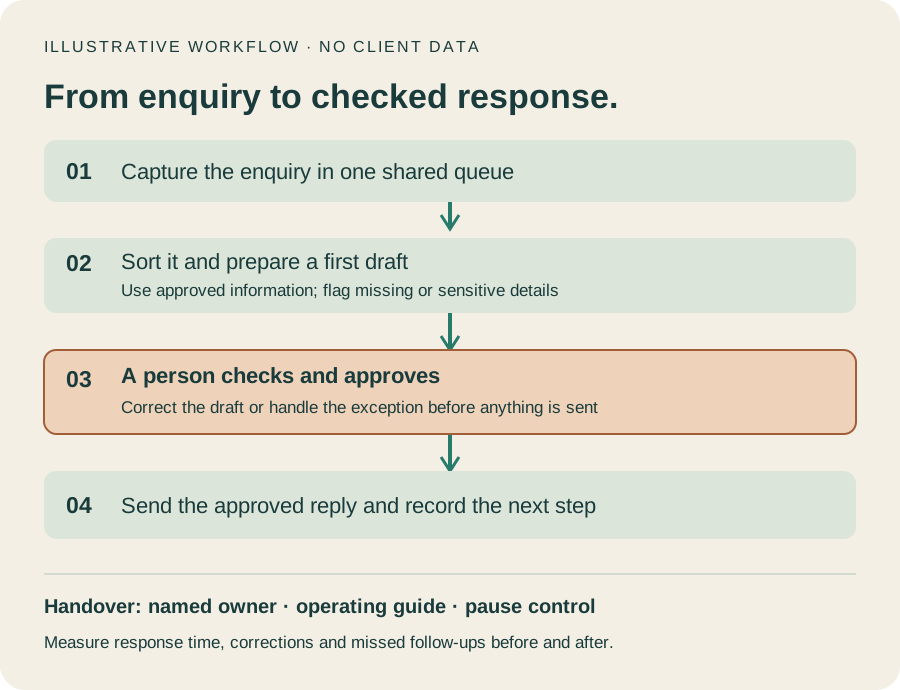
- Capture the enquiryKeep the request in one shared queue.
- Prepare a first draftUse approved information and flag missing details.
- A person checks and approvesCorrect the draft or handle the exception before sending.
- Send and recordSend the approved reply and record the next step.
A draft is ready. You decide what happens next.
Enquiry: a prospective customer asks about service availability.
Draft: prepared from approved service information, with missing details flagged.
Your choices: edit and approve, return for correction, or handle it yourself. Nothing is sent until approval.
What handover covers
- The agreed workflow and a walkthrough for its owner.
- Instructions for routine work, exceptions and failures.
- Where to check activity and how to pause the workflow.
- The measures agreed for checking whether it is useful.
What a sprint builds
A sprint builds one or two workflows from your AI Readiness Report roadmap. Typical candidates are:
- Enquiry triage: enquiries organised and response drafts prepared for staff approval.
- Quote follow-up: quotes chased consistently instead of when someone remembers.
- Content pipelines: from idea to published, without depending on the owner’s spare time.
- Document intake: incoming documents captured and routed.
Crewible setup and adoption for your business
Crewible is an AI crew system from Wild Hearts: specialist agent templates, shared business knowledge and review rules, running in Claude Code. AUUSI provides the practical help to configure and adopt it where it fits your business.
- Fit and scope: choose a useful first workflow and name the person responsible for it.
- Configure: adapt the crew roles and shared knowledge, with agreed access and approval boundaries.
- Pilot: test the workflow with suitable information, review its output and work through exceptions.
- Train and hand over: show your team how to brief the crew, check its work and pause or escalate a task.
Crewible's review layer supports your checks; your business remains responsible for approvals and decisions. An AI crew still needs an owner.
Two ways to get started
With AUUSI: start with the free AI check, then ask about Crewible setup and adoption. We agree the scope and a fixed quote before work starts.
Install it yourself: see Crewible's current product price and installation requirements. The product purchase does not include AUUSI consulting.
Crewible licensing and any required Claude plan or usage charges are separate from AUUSI fees unless your written quote explicitly includes them. Ongoing adoption support is optional.
What you can count on
- Fixed price before we start. No hourly creep and no surprises.
- Handover training included, so your team runs it from day one.
- It ends with something live. From first answers to a working workflow is usually four to six weeks, assuming you have the time to be in the room for the parts that need you.
Price and what’s not included
$8,000–$24,000 fixed quote after the report · no GST charged
The report comes first because it’s what makes the quote accurate: it names the workflows, the tools and the costs. Where you land in the range depends on how many workflows are built and how many systems they connect to. Not included: the AI tool subscriptions themselves, typically $20–$80 a month per tool, which are named with prices in your report before you commit to anything. See what actually drives the cost up or down.
After the sprint
Workflows need looking after. Ongoing AI Ops keeps them working, tunes them as your business changes and extends the roadmap one item at a time, on a monthly plan you can cancel any month. It’s optional.
The five stages: AI Clarity Engine (free) → Team AI Session → AI Readiness Report → Implementation Sprint → Ongoing AI Ops. See the full approach.
Questions
Do I need the report first?
The sprint is quoted after the written AI Readiness Report, because the report is what defines the workflows, tools and costs. The free AI Clarity Engine is where to start, and it will show whether you are ready for a build or whether groundwork should come first.
Will I see something working, or a prototype?
Something live. A sprint runs two to four weeks and ends with a working workflow in your business, not a demo.
What does it really cost, including the parts you haven’t mentioned?
Every price is fixed and agreed in writing before work starts. The costs that are genuinely not included are the AI tool subscriptions, typically twenty to eighty dollars a month per tool, and they’re named with prices in your report before you commit.
Can my own team run it afterwards?
Yes. Handover training is included so your team runs it from day one. Ongoing AI Ops is there if you want help keeping it tuned, but it’s optional.
Find out whether a sprint fits.
Start with the free check. Its summary tells you honestly whether you’re ready for a build, or whether groundwork should come first.
Free summary · Optional full report $20 · About 30 minutes · No obligation · Already have your report? Ask for a fixed quote.